StepCert Buy for $99 a year

Do the task once. Get the guide and the training course.

StepCert records your clicks in Chrome or Edge, writes every step for you and marks exactly where to click. Share it as a Word document or web page, or upload it to your LMS as a course where people practise the task and earn a certificate.

See how it works

Your recordings stay on your computer. One price with everything included, and a 30-day money-back guarantee.

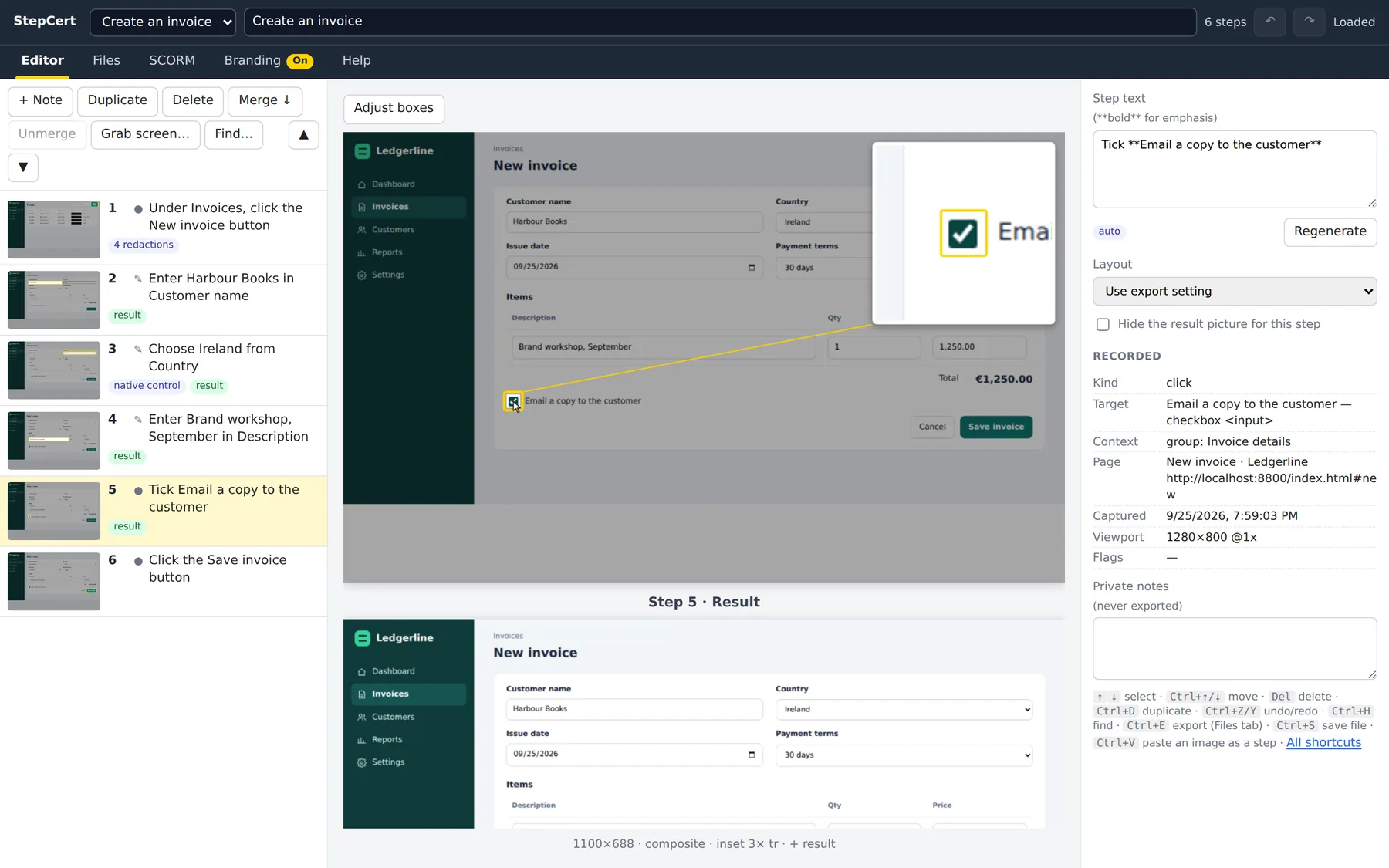
The StepCert editor showing six recorded steps. Step 5, “Tick Email a copy to the customer”, has a yellow box around the checkbox and a magnified close-up in the corner.
The editor after one run-through of an invoicing app. StepCert added the yellow box, the step number, the magnified close-up and the sentence on the right.

A how-to written by hand takes an afternoon

Twenty screenshots. Cropping, arrows and numbers. Blurring the customer's details. Describing every click so someone new can follow it. Then the training team asks for it in the LMS, and it gets rebuilt in an authoring tool. Then the app changes.

StepCert does the capturing, the wording, the arrows and the course. You check it, fix anything you want, and export.

How it works

  1. Record

    Press Start recording and use the web app as you normally would. Each click, choice or typed value becomes a step with a screenshot and a sentence, such as “Choose Ireland from Country”. The side panel shows every step the moment it lands.

    • Works across tabs and windows, and inside frames
    • Takes a “what you should see next” picture after a page changes
    • Password and card fields are recorded as “Enter your Password”, never the value
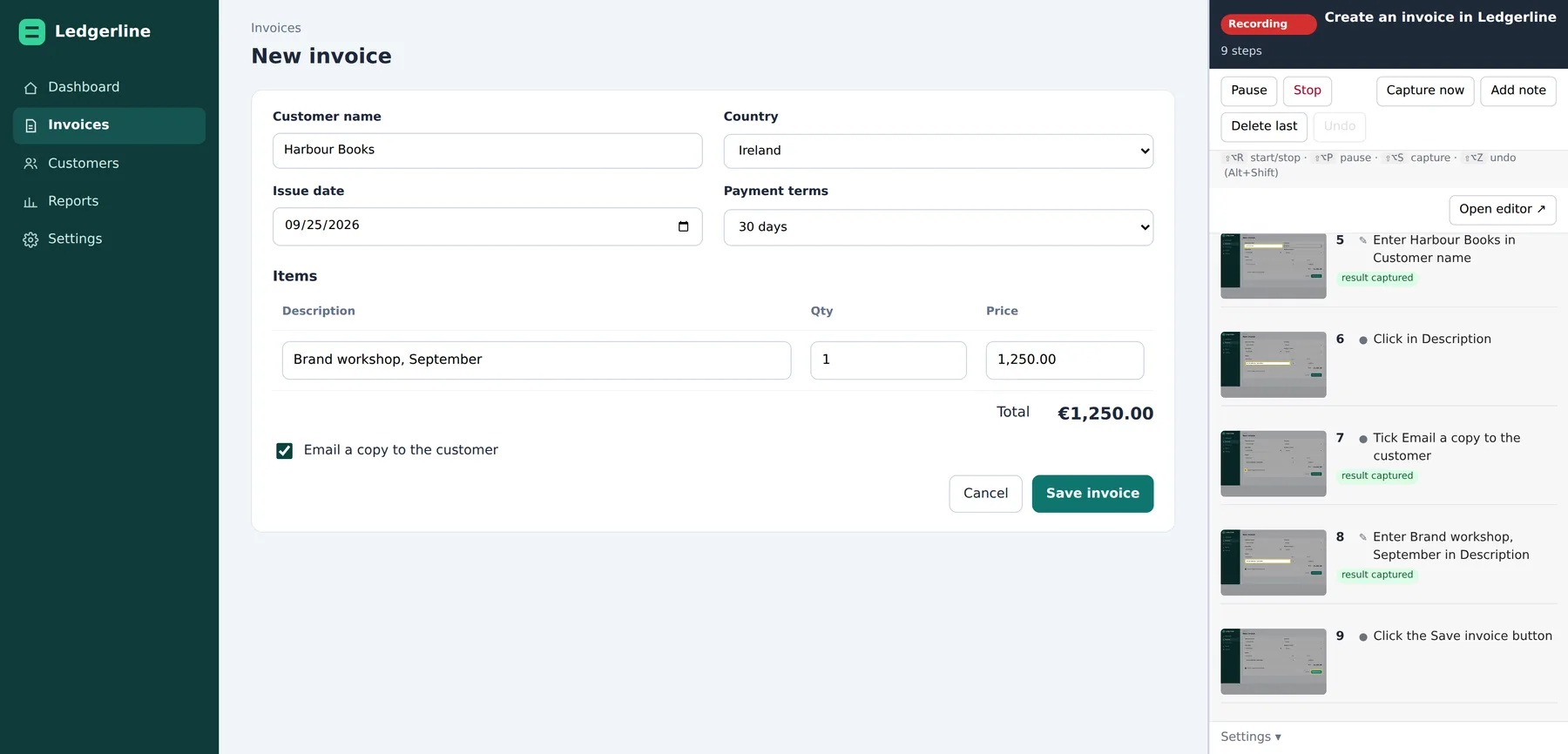
    The Ledgerline invoicing app with a new invoice filled in, next to the StepCert side panel listing nine recorded steps with thumbnails.
    Recording in the browser, with the side panel open.
  2. Tidy up

    Drag steps into order, reword them, or merge two clicks into one numbered picture. Move the highlight, crop, or draw black boxes over anything private. Dropdown lists that a screenshot can't see are drawn back in, with the chosen option highlighted.

    • Undo and redo for every change
    • Paste an image or grab another window to add a step from outside the browser
    • Find and replace across all step text
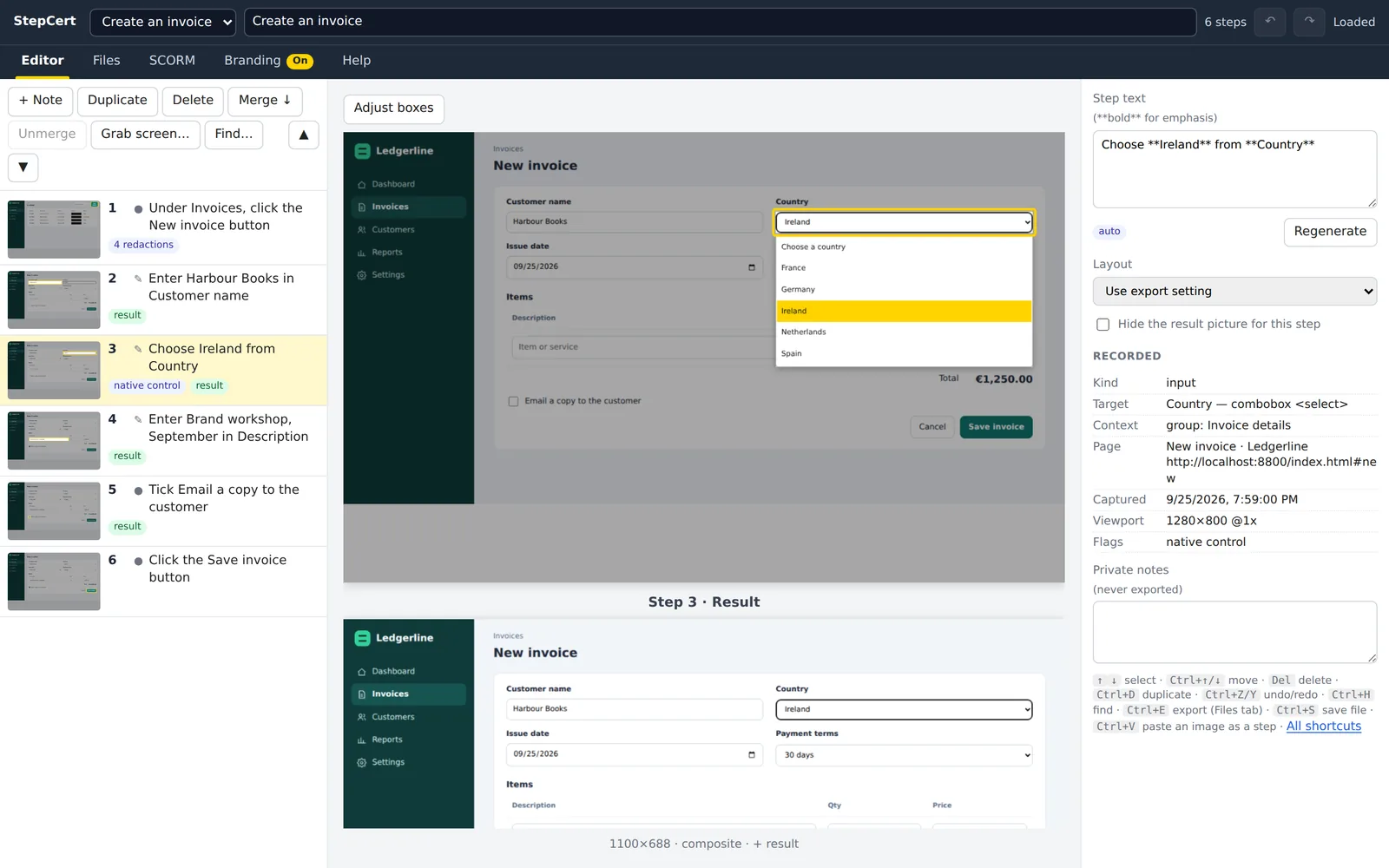
    The editor showing the step “Choose Ireland from Country” with the dropdown list redrawn and Ireland highlighted in yellow, and the result picture below.
    The dropdown list was redrawn by StepCert. The screenshot itself only showed the closed box.
  3. Share it

    Export a Word document to edit, print or save as a PDF. Or export a single web page that works offline and follows the reader's light or dark mode, or a Markdown bundle for your wiki or Git repository. Or build an LMS course from the same steps.

    • Every picture has alt text written for screen readers
    • Export as often as you like; your steps are never changed
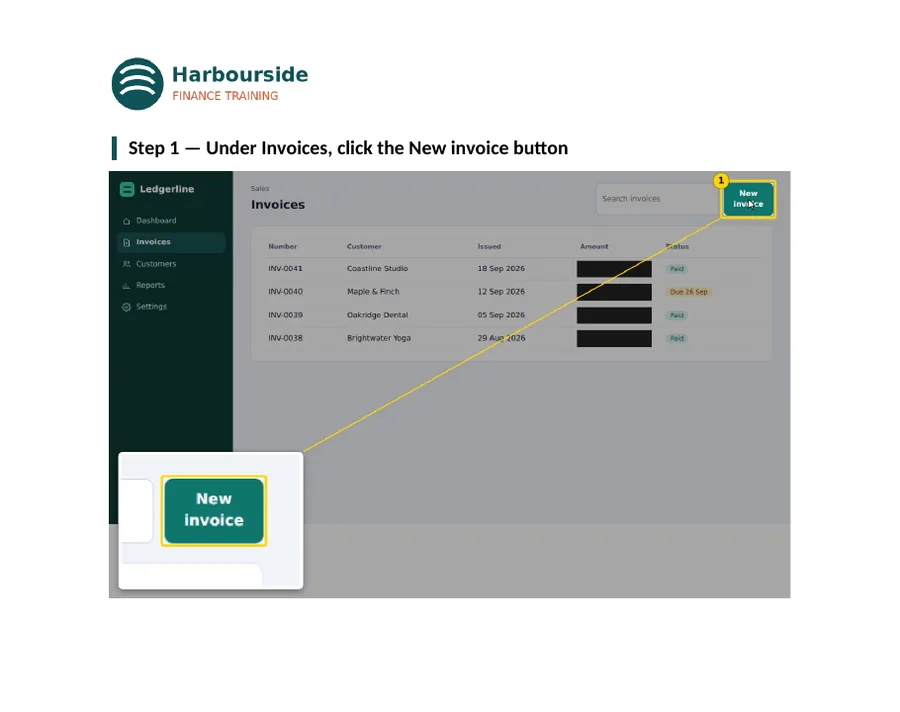
    Word document page for step 1, with the invoice list screenshot, a yellow box on New invoice and the amounts blacked out.
    Word, step 1
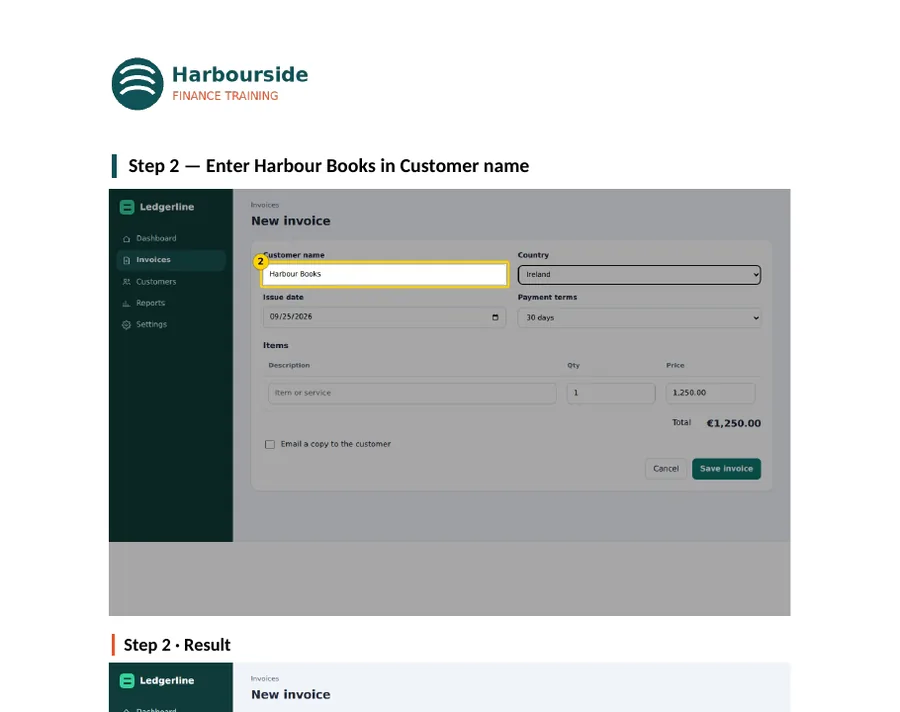
    Word document page for step 2, with the Customer name field highlighted and a magnified close-up.
    Word, step 2
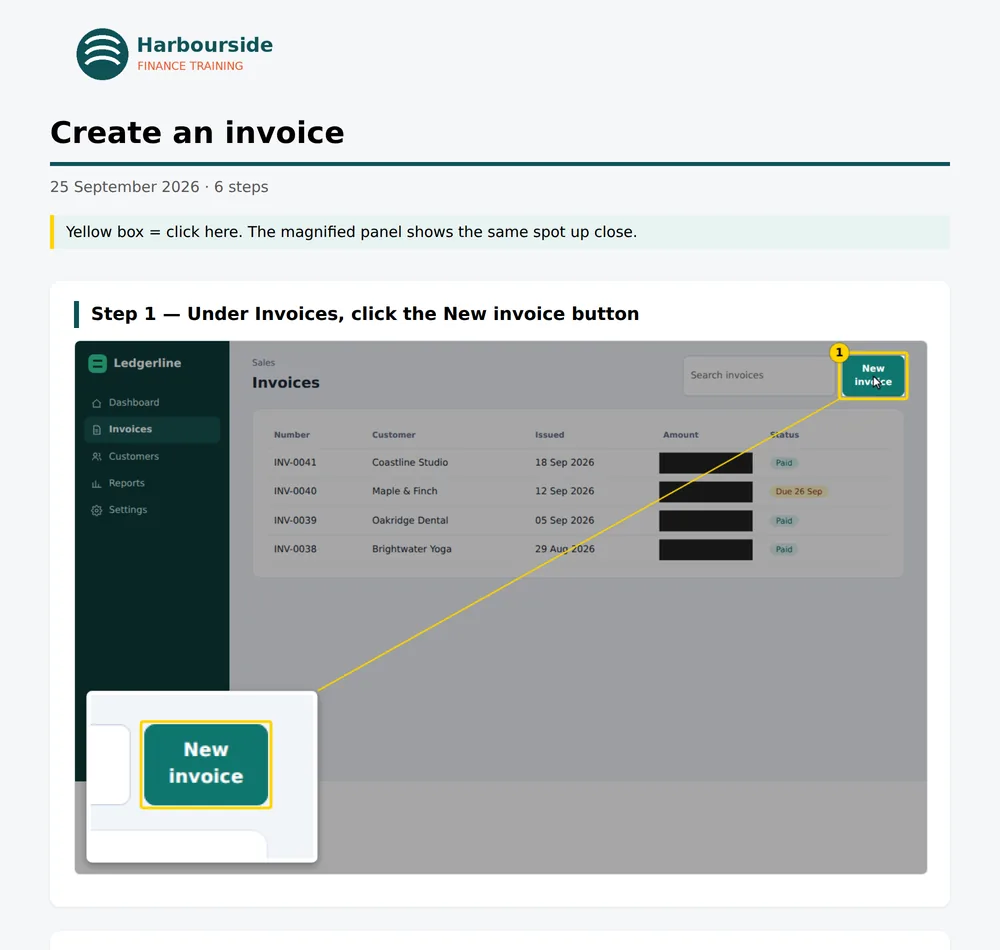
    The exported web page in light mode, showing step 1 with the magnified New invoice button.
    Web page, light mode
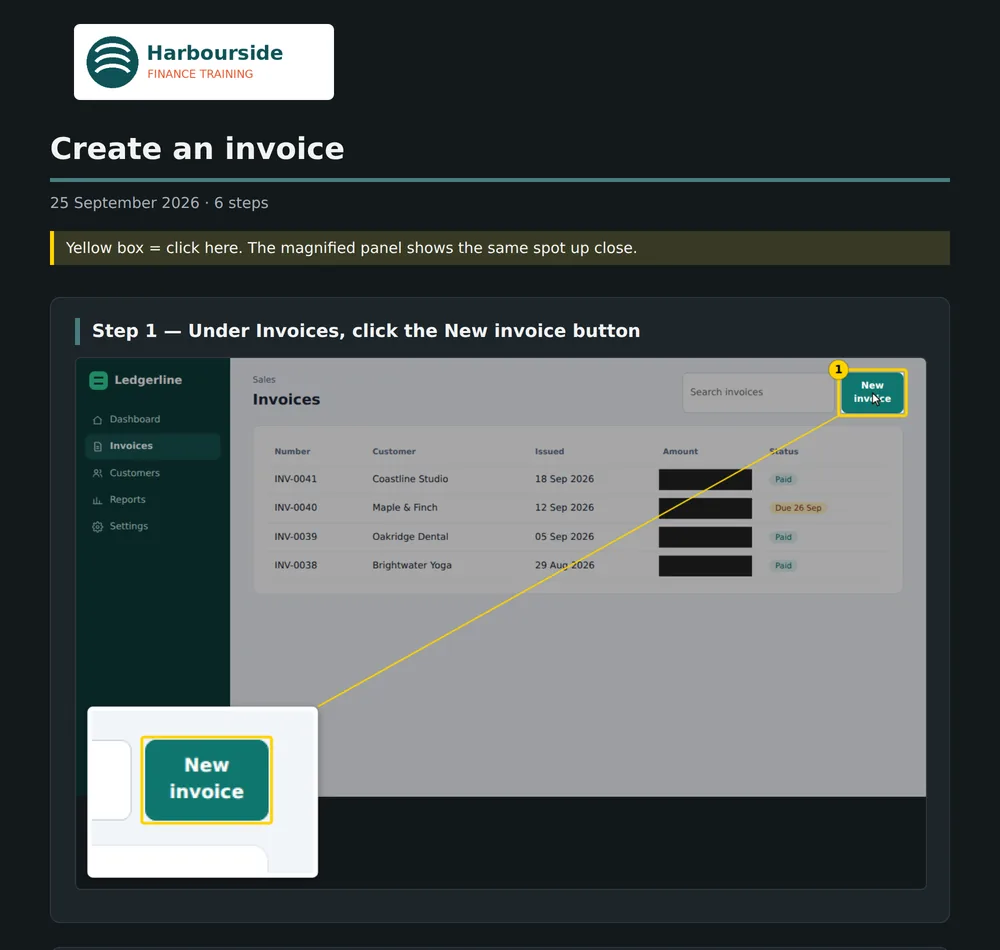
    The same exported web page in dark mode.
    Web page, dark mode

From a guide to a course people can pass

Most recording tools stop at the document. StepCert turns the same recording into an LMS course where people learn the task by doing it: first they watch, then they practise from memory until they get it right. Passing a level issues a certificate, and your LMS records the result.

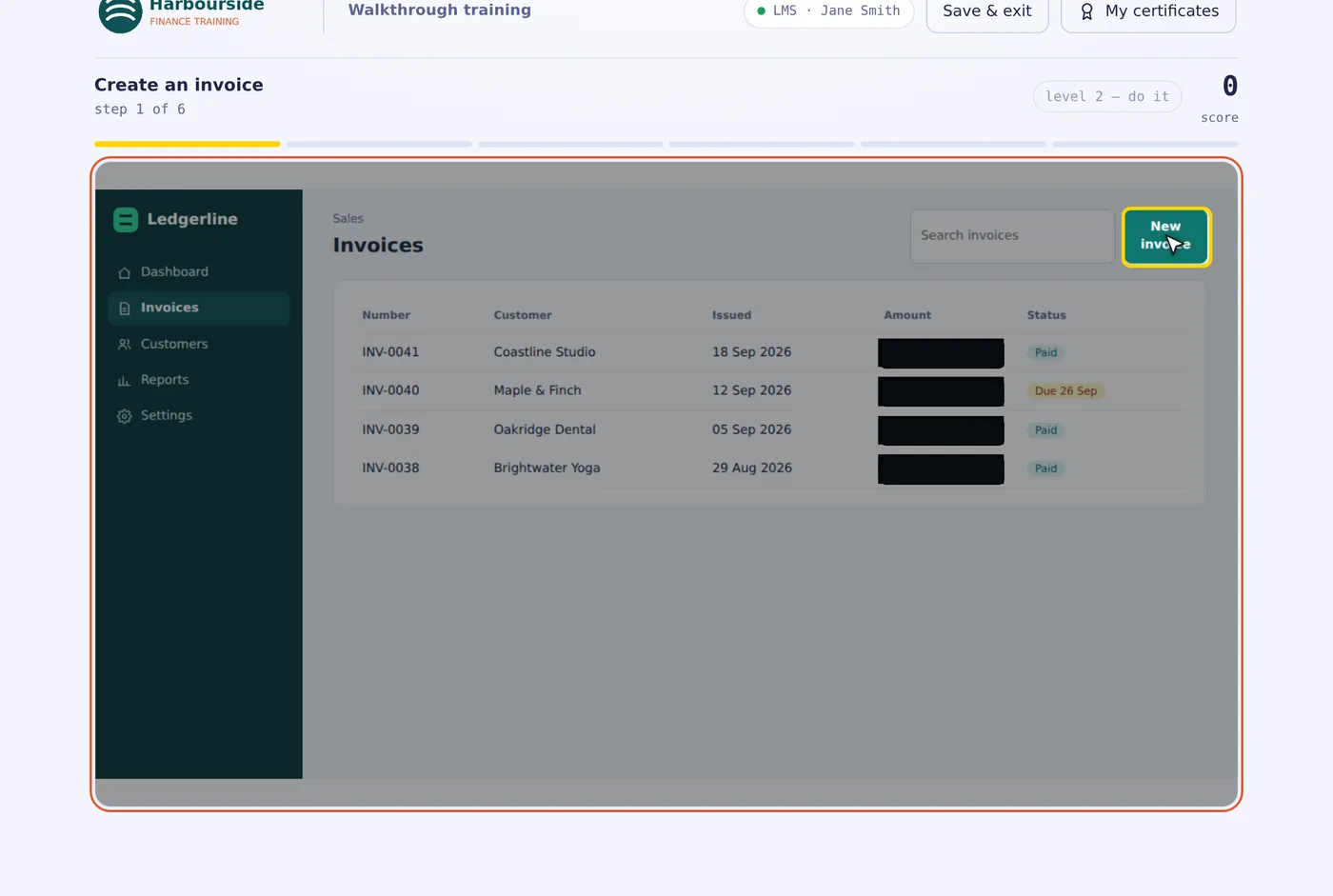
A practice level in the course player. The learner asked for a hint, so the New invoice button has a yellow box.
Level 1. The target stays hidden until the learner finds it or asks for a hint.
Watch
Plays the whole walkthrough at several speeds, or step by step with the arrow keys.
Level 1: Spot it
The instructions are hidden. Learners click each target from memory. Wrong clicks don't cost points.
Level 2: Do it
Everything in Level 1, plus typing the values and picking the options that were recorded.
Level 3: Nail it
A full run, then every missed step is practised again in context until it's right first time, with no hint.
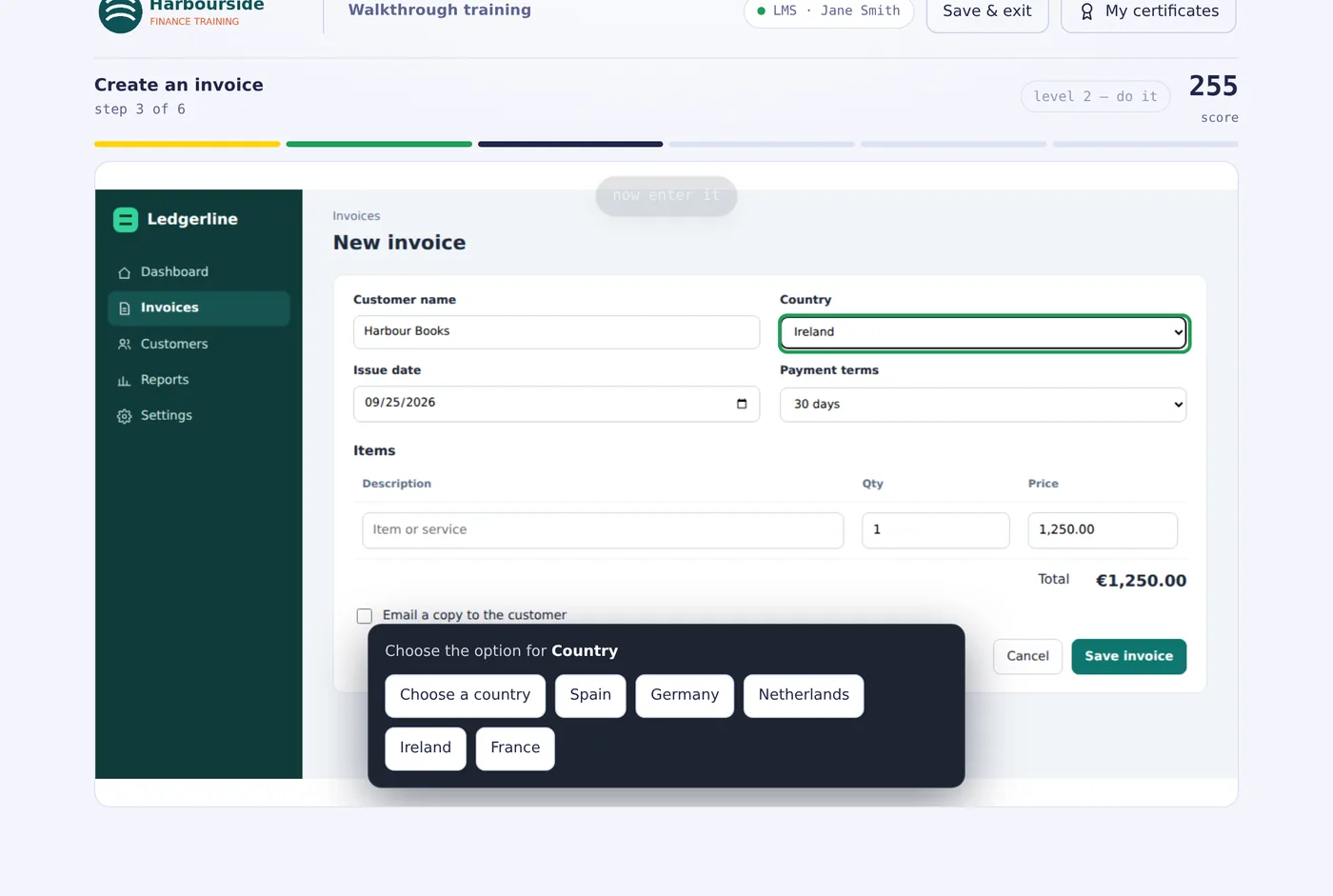
Level 2 asking the learner to choose the option for Country from a list of countries.
Level 2 asks for the real values, not just the right spot.
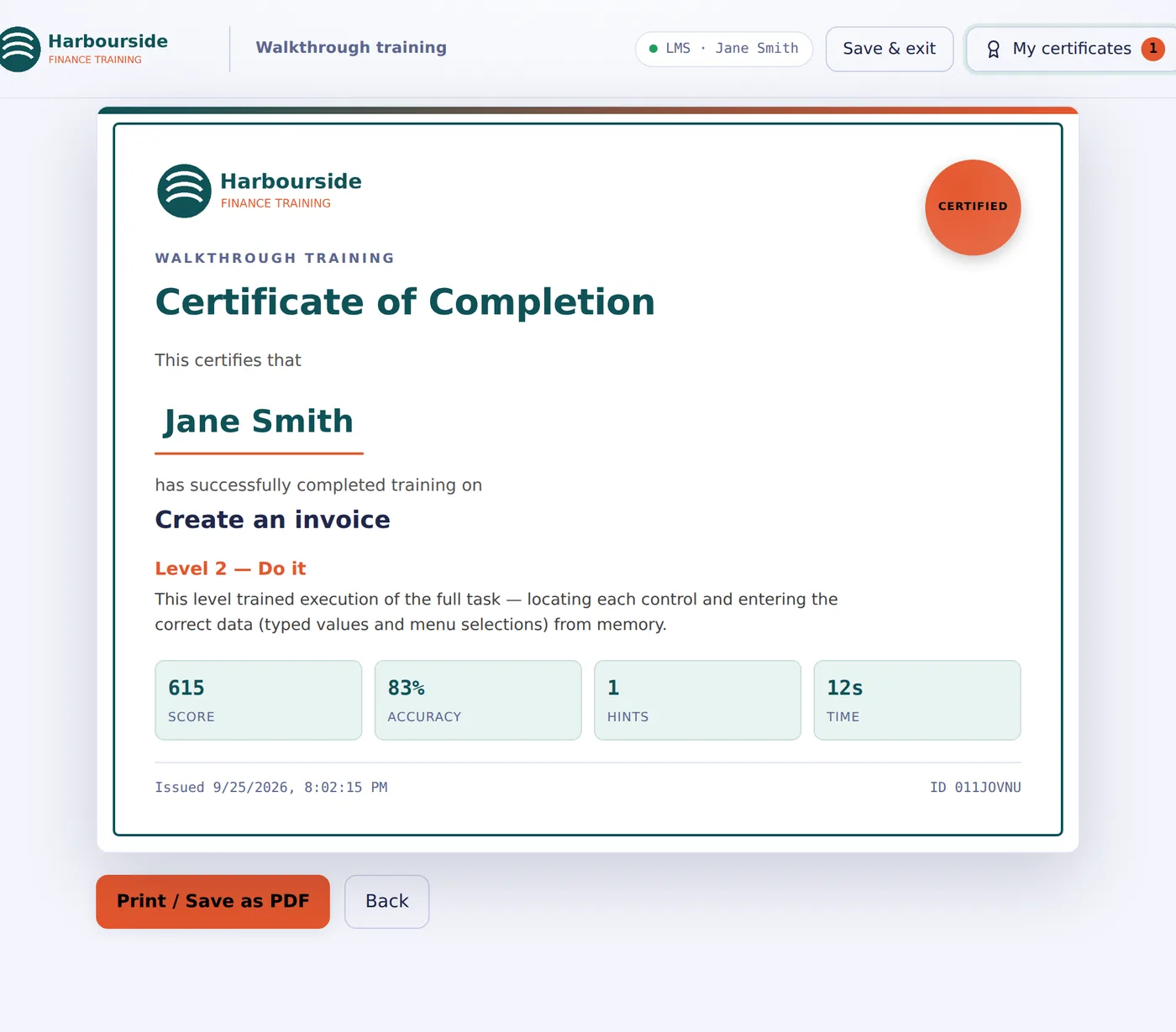
A branded Certificate of Completion for Jane Smith, Level 2, with score, accuracy, hints and time.
Certificates carry your logo and the learner's name from the LMS.

What your LMS receives

  • Completion, score and pass or fail, using your pass mark
  • Optionally, every step of every run: right first time or not, clicks, hints and time taken
  • A one-line summary per run, readable in any LMS report
  • Saved progress, so learners keep their certificates between visits

Four standards, one click each

SCORM 1.2
Works in virtually every LMS.
SCORM 2004
2nd, 3rd and 4th Edition, with completion and pass reported separately.
xAPI (Tin Can)
Detailed statements sent to your learning record store.
cmi5
The modern LMS launch standard built on xAPI.

SCORM manifests are checked against the official ADL schema files. Each format keeps its own settings: pass mark, which levels count, how a fail is reported, and more.

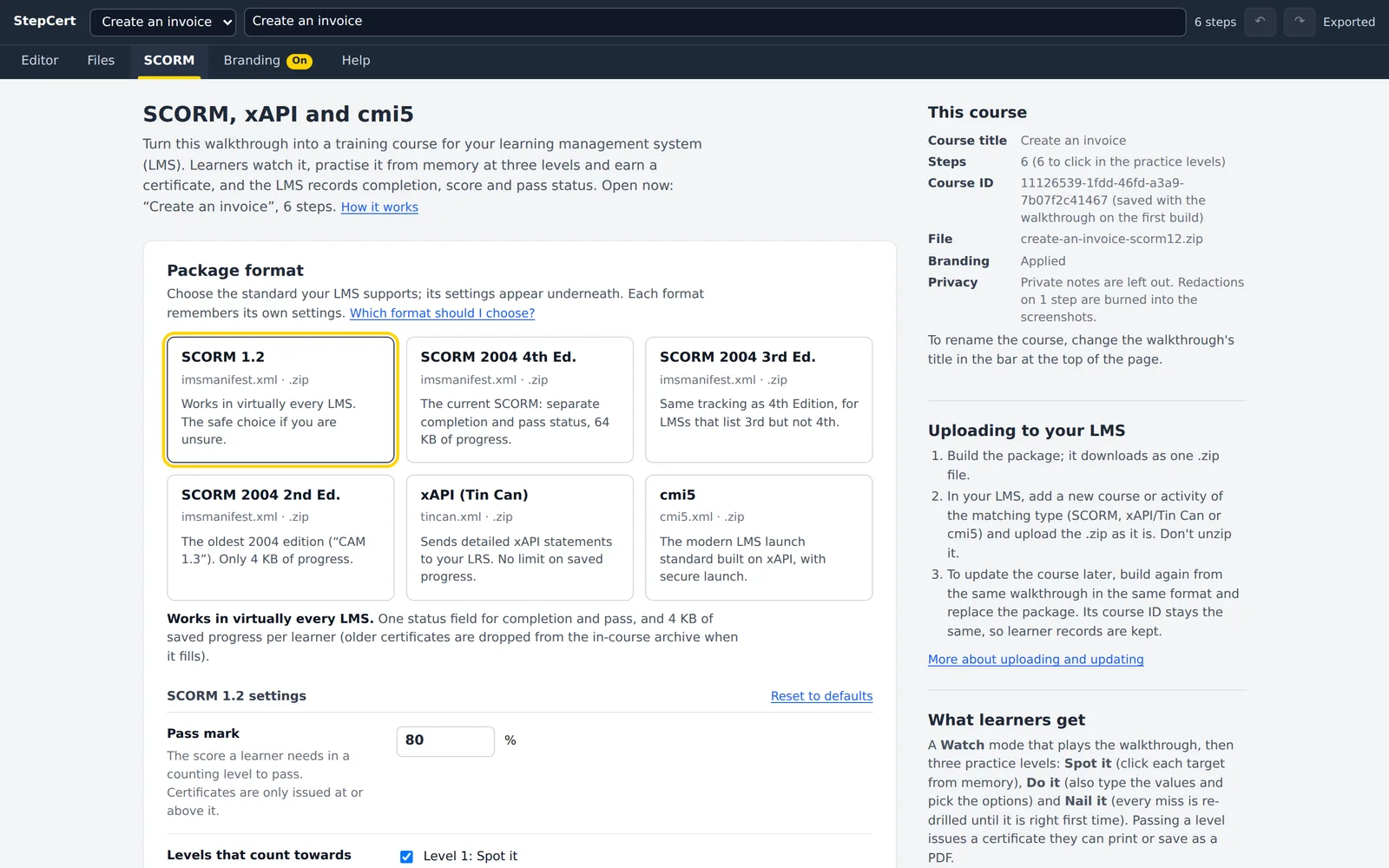
The SCORM tab in StepCert with six format cards and the SCORM 1.2 settings underneath.
The SCORM tab. Pick a format, check its settings, build.

A course authoring suite such as Articulate 360 lists at $1,449 a year for one person. That buys far more than StepCert does, but if what you need is “show people how to do this in our system, and prove they can”, StepCert does that for $99.

Your screenshots never leave your computer

Screenshots of internal systems are full of customer names, prices and account numbers. Cloud recording tools upload every one. StepCert keeps them in your browser. The only thing it sends is sign-in information, to check that your licence is active.

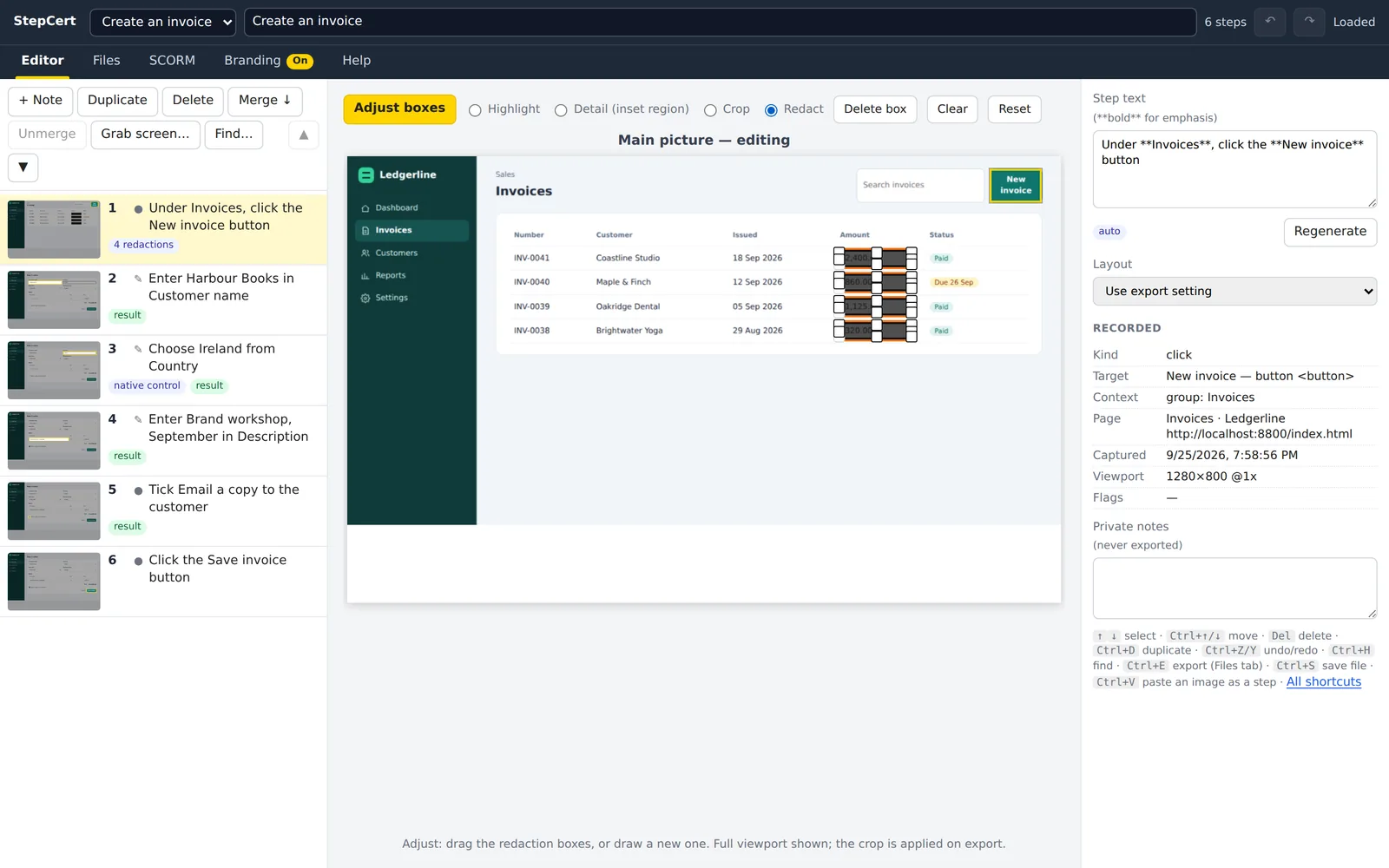
The editor in Adjust mode with the Redact tool selected and black boxes drawn over four invoice amounts.
Drawing redaction boxes over invoice amounts.
No account, no upload
Recordings and screenshots are stored in your browser profile. StepCert has no server that could see them.
Redaction you can trust
Black boxes are burned into the pictures in every document and course, so the hidden detail isn't in the file at all.
Private notes stay private
Notes you keep on a step are never exported or put into a course.
No AI service
Step wording comes from the labels a screen reader would announce, worked out on your computer.
Quiet courses
Courses load nothing from the internet and talk only to the LMS they're uploaded to.

Your logo and colours, on everything

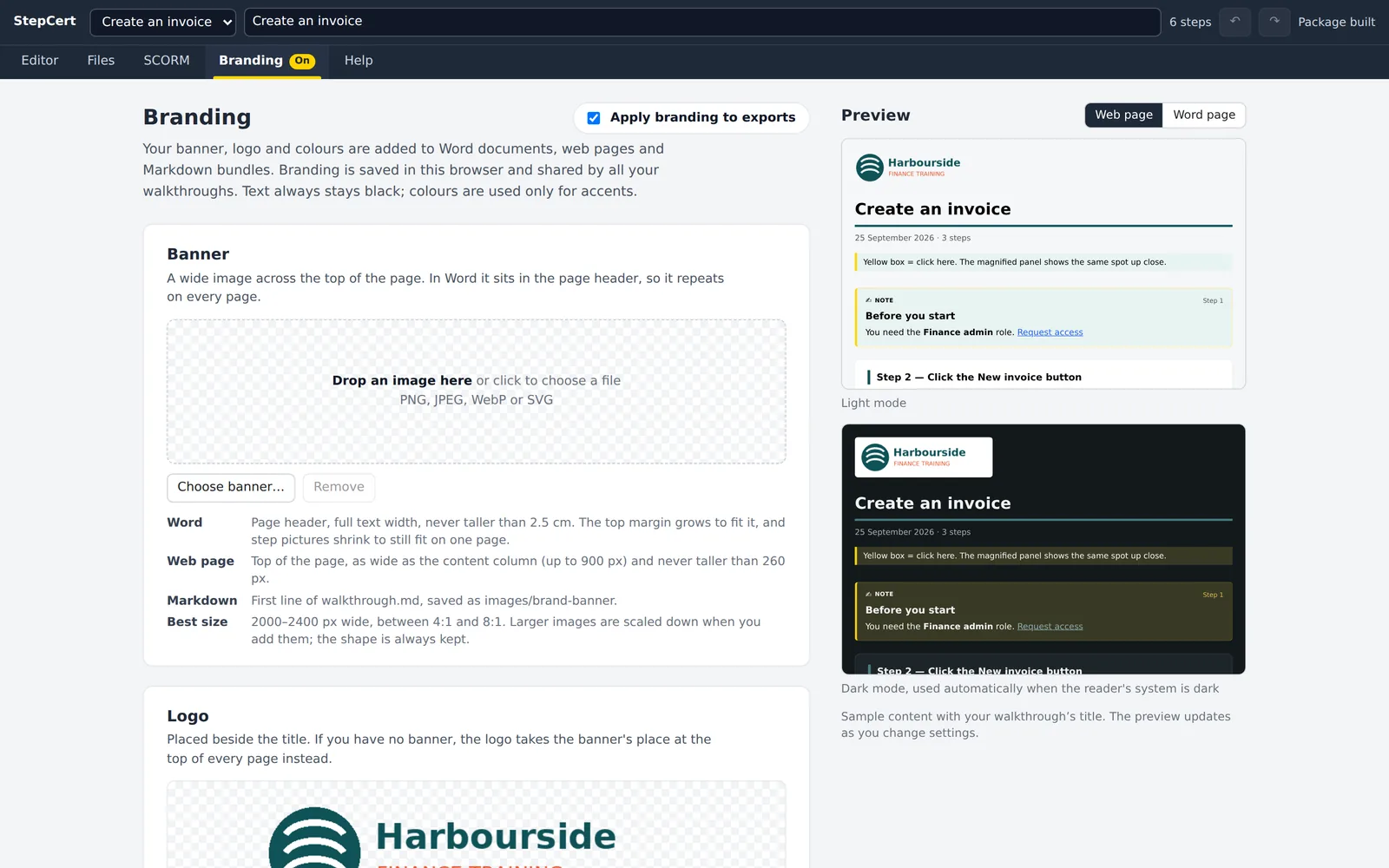
Add a banner, a logo and up to ten colours, each with one job, such as headings, links or the header band. They go into Word documents, web pages, Markdown bundles, courses and certificates. StepCert checks every colour for contrast and adjusts any that would be hard to read, so a brand colour never makes text disappear.

Prefer your own highlight colour instead of yellow? Switch on screenshot colours and the boxes, badges and redactions use your palette too.

The Branding tab with the Harbourside Finance logo and live previews of the web page in light and dark mode.
The Branding tab previews light and dark mode as you go.

How StepCert compares

Other tools are good at what they do. Here is where they differ, using each company's own published plans for one person.

FeatureStepCertScribePro PersonalTangoPro, 1–2 usersioradIndividual
Price for one person$99 a year$300 a year$264 a year$200 a month
Where your screenshots are keptYour computerScribe's cloudTango's cloudiorad's cloud
Word documentYesNot listedNot listedYes
Web page and MarkdownYesYesYesEnterprise only
SCORM course for your LMS1.2 and 2004Not listedNot listedEnterprise only
xAPI and cmi5YesNot listedNot listedNot listed
Practice levels and certificatesYesNot listedNot listedPractice modes
Records desktop appsScreen grab onlyYesYesYes

Checked on 25 September 2026 on each company's pricing and feature pages, in US dollars, billed annually where there is a choice. “Not listed” means we couldn't find it on those pages; features and prices change, so check before you decide. Scribe, Tango and iorad are trademarks of their owners, who don't endorse StepCert.

Where others are the better choice

If you mostly document desktop software, Scribe, Tango and iorad all record desktop apps automatically; StepCert records the browser and can add a screen grab from any other window. If you want guides that live as shared links with viewer analytics, the cloud tools do that and StepCert doesn't: StepCert gives you files you own.

Work out what it saves you

Put in your own numbers. The estimate uses the time you save per guide, so it doesn't count the course you'd otherwise have to build separately.

One plan with everything in it

$99a year

For one person. Unlimited walkthroughs, exports, courses and learners.

  • Recording in Chrome, Edge and other Chromium browsers
  • Word, web page and Markdown export
  • SCORM 1.2, SCORM 2004, xAPI and cmi5 courses
  • Practice levels and certificates
  • Your banner, logo and colours
  • Every update while you're subscribed
  • Email support from the people who make it

Secure checkout by Stripe. Cancel any time from your account page. Documents and courses you've already made keep working after you cancel. If StepCert isn't right for you, email us within 30 days for a full refund.

Buying for a team? Each person needs their own licence. For 10 or more, email us.

Questions

Are my recordings or screenshots uploaded anywhere?

No. Recordings, screenshots and settings are stored in your browser on your computer. The only thing the extension sends anywhere is sign-in information: your email address and licence key once, when you sign in, and then a sign-in token about once a day to check that your licence is still active. Files leave your computer only when you export them and send them somewhere yourself. To back up a walkthrough or move it to another computer, save it as a .walk file.

Which browsers does it work in?

Chrome, Microsoft Edge and other browsers built on Chromium.

Can I use it on more than one computer?

Yes. Sign in with your email address and licence key on up to 3 browsers at a time, for example at work and at home. Signing in on a fourth signs out the one you used least recently. StepCert keeps working for up to 7 days without an internet connection.

Can it record desktop apps?

StepCert records web apps in the browser, across tabs and windows. For a step outside the browser, use Grab screen… in the editor to capture any window or screen, or paste a screenshot. You then write that step's text yourself.

Will the course work in my LMS?

If your LMS accepts SCORM 1.2, SCORM 2004, xAPI (Tin Can) or cmi5 packages, yes. StepCert builds packages to the published standards and checks SCORM manifests against the official schema files. Upload the .zip the same way you'd upload any other SCORM or xAPI course. If you'd like to try one first, a free test account at a SCORM testing service will run it.

Can I update a course after learners have started?

Yes. Each walkthrough keeps a fixed course ID, so when you fix a step and build again in the same format, the new package replaces the old one in your LMS and learner records carry over.

Does it use AI?

No. The step text comes from the names a screen reader would announce for each button and field, such as “Click the Save button”. It's worked out on your computer, and you can reword any step.

What happens if I cancel?

Everything you've exported and every course you've uploaded keeps working. They're ordinary files and never check your licence. You can cancel any time from your account page, and you won't be charged again.

Can I get a refund?

Yes. Email us within 30 days of buying and we'll refund you in full.

Do I get an invoice?

Stripe emails a receipt when you pay. You can download invoices and update your card from your account page.

I've lost my licence key

Go to Manage your licence and enter the email address you bought with. We'll send the key to it.

Record your first walkthrough today

See the comparison