StepCert Buy for $399 a yearBuy StepCert

Healthcare · Financial services · Life sciences · Public sector · Legal

Training for regulated systems, without a cloud copy of your screens.

  • Record once. Every click becomes a written step, stored in the browser on your computer.
  • Personal details removed as you record. Names, emails, phone, card and bank numbers, dates of birth and national ID numbers become example data, in the text and the pictures. The originals never go into a document or course.
  • Hide the rest. Hide boxes are burned into every file, and every export is checked for anything that still looks personal.
  • Prove competence. SCORM, xAPI or cmi5 courses where people do the task themselves, with your pass mark, a certificate and a step-by-step record in your LMS.
  • Nothing to upload. The extension sends us only what it needs to check your licence.
  • No AI service. Step wording is worked out on your computer.

For the people who train others on patient, customer and client systems: L&D teams, system trainers, compliance and risk, and the data protection and security teams who have to approve the tools.

Two problems every regulated training team knows

Attendance isn't competence

Training rules in regulated sectors are about people being able to do their job, and many organisations won't give someone access to a live system until they've shown they can use it. A slide deck and a tick box show that someone sat through the training, not that they can do the task.

A screenshot of a record is the record

A screenshot of a patient chart, a customer account or a client file holds the same details as the system it came from. Upload it to a documentation service and that service now holds regulated data: another vendor to assess, contract with and keep an eye on.

What leaves your computer, and what doesn't

StepCert has no server that could see your recordings. This is what the extension sends, and where.

Stays on your computer

  • Screenshots and “what you should see next” pictures
  • Step text, including values typed while recording
  • The originals of personal details replaced with example data
  • Page titles and addresses
  • Hide boxes, notes and private notes
  • Your branding, settings and settings templates
  • The videos, documents and SCORM packages you add in the Course builder: linked on your disk, never copied anywhere but the package you build
  • Documents, courses and .walk files, until you send them somewhere yourself

Goes to stepcert.com, only to check your licence

When you sign in
Your email address, your licence key, a random ID for that browser and a description such as “Chrome on Windows”. The key isn't stored in the extension.
About once a day
A sign-in token and that browser's random ID, to confirm the licence is still active.
When you choose Manage subscription
A sign-in token, to open your Stripe billing page.
When you sign out
The sign-in token, so we can remove that browser from your licence.

One request goes to anyone else, and only if you ask for it: when an author adds a YouTube, Vimeo or SoundCloud link to a course, the extension asks that service for the video's title and thumbnail. The request contains the video's address, with no cookies and no referring page, and goes straight to that service. Add no such links and the extension talks to stepcert.com alone.

Courses you build send learners' results only to the LMS or learning record store you upload them to, and load nothing from the internet unless you put a YouTube or Vimeo video in one, which then plays from that service. The extension has no analytics, crash reporting or tracking. Full details are in our privacy policy.

Where it fits, sector by sector

What the rules ask of training and suppliers, in plain words, and where StepCert fits. This is our summary to help you see the fit, not legal advice: your compliance, privacy or legal team has the final word.

Healthcare and care

What the rules ask

  • HIPAA (US). Covered entities must train their workforce on their privacy policies and procedures, and run a security awareness and training programme. A vendor that creates, receives, maintains or transmits protected health information on their behalf is a business associate and needs a business associate agreement.
  • NHS Data Security and Protection Toolkit (England). Organisations with access to NHS patient data and systems must make sure all staff have an appropriate understanding of data security and information governance for their role.
  • Proficiency before access. Many hospitals don't issue system log-ins until staff pass a proficiency check.

Where StepCert fits

  • Screenshots of patient screens stay on the computer they were recorded on. StepCert never receives them. Whether you need an agreement with any supplier is for your privacy officer to decide.
  • Level 3 and your pass mark give a proficiency check that runs in your LMS, with a named certificate.
  • Record in your training environment with test patients. Patient names, dates of birth, addresses, phone numbers and emails typed while recording become example data; cover anything else with Hide boxes.

Check first: StepCert records systems that run in the browser. Desktop programs, including many clinical systems and apps delivered through a remote desktop, can only be added as screen captures, one step at a time. StepCert doesn't recognise NHS numbers or medical record numbers: hide those by hand.

Banking, insurance, payments and investment

What the rules ask

  • DORA (EU, since January 2025). ICT security awareness and digital operational resilience training is compulsory for all staff, senior management included. ICT third-party providers must be managed and recorded in a register of information.
  • FCA (UK). Firms must employ people with the skills and knowledge for their responsibilities, the Training and Competence rules stop staff doing certain activities until they're assessed as competent or supervised, and under SM&CR firms certify certain staff as fit and proper every year.
  • SEC Regulation S-P (US). Firms must oversee service providers with access to customer information. Larger firms have had to comply since 3 December 2025, smaller ones since 3 June 2026.
  • NYDFS Part 500 (New York). Cybersecurity awareness training for all personnel at least once a year, and policies for third-party service providers.
  • PCI DSS. A screenshot that shows a full card number is cardholder data that has to be protected like any other.

Where StepCert fits

  • A certificate for each named learner at your pass mark, and step results in your LMS: a record that someone did the task, not just opened a deck.
  • Screenshots of customer accounts aren't sent to us, so there's no customer information on our side. The licence is still a service from a third party: assess it as your policies require, using the list above.
  • Card-number and security-code fields are recorded as dots. Card numbers (checked like real ones) and IBANs anywhere on the page, and sort codes, account numbers, names and emails typed into forms, become example data as you record.
  • No AI service, for firms whose policies restrict AI tools.

Check first: account numbers and sort codes shown as plain text on screen, rather than typed into a labelled field, aren't found: hide them by hand, or record with test accounts.

Pharma, biotech and medical devices

What the rules ask

  • FDA 21 CFR 211.25 (US). People who manufacture, process, pack or hold drug products must be trained in the particular operations they perform and in current good manufacturing practice, including the written procedures, often enough to stay familiar with them.
  • EU GMP Annex 11. Covers computerised systems used in GMP work, including the people who use them. A revised draft was published for consultation in July 2025.

Where StepCert fits

  • Turn the procedure for a web-based system into a guide and a course from one recording, and rebuild both when the system or the SOP changes.
  • Upload the course to your LMS, which keeps the training record. The course ID stays the same, so your LMS can take an updated package as the same course and keep learner records.
  • The optional metadata line puts the page, address, control and capture time under each step.

Check first: StepCert isn't validated software, and its certificates aren't electronic signatures under 21 CFR Part 11. Your LMS stays the system of record.

Government, public services and defence suppliers

What the rules ask

  • CMMC and DFARS (US defence contractors). Controlled Unclassified Information (CUI) must be protected under NIST SP 800-171, which includes awareness and training requirements, and CMMC checks this in contracts from 10 November 2025. A cloud service that stores, processes or transmits CUI must meet FedRAMP Moderate or equivalent.
  • UK and EU public bodies. Data protection law and government security policies decide where personal and official information may be stored, and transfers outside the UK or EU need safeguards.

Where StepCert fits

  • A screenshot of a system holding CUI or official information can itself contain it. StepCert keeps screenshots on the computer they were taken on, and exports go only where you put them.
  • Word, PowerPoint, web page and Markdown exports give every picture alt text written for screen readers.

Check first: StepCert has to reach stepcert.com at least once every 7 days to check the licence, so it can't be used on disconnected or classified networks.

Under UK or EU GDPR: we don't receive your recordings, documents or courses, so we don't process the personal data in them for you, and there's nothing about them to add to your list of processors or your transfer assessments. Within them, the personal details StepCert recognises are replaced with example data as you record, so documents and courses carry less personal data to begin with. For licence sign-in we handle your email address as described in our privacy policy.

What it means for you

Competence before access

The course makes people do the task: find each control from memory, type the values and choose the options, then repeat any missed step until it's right first time. Your LMS gets the result and, if you choose, every step.

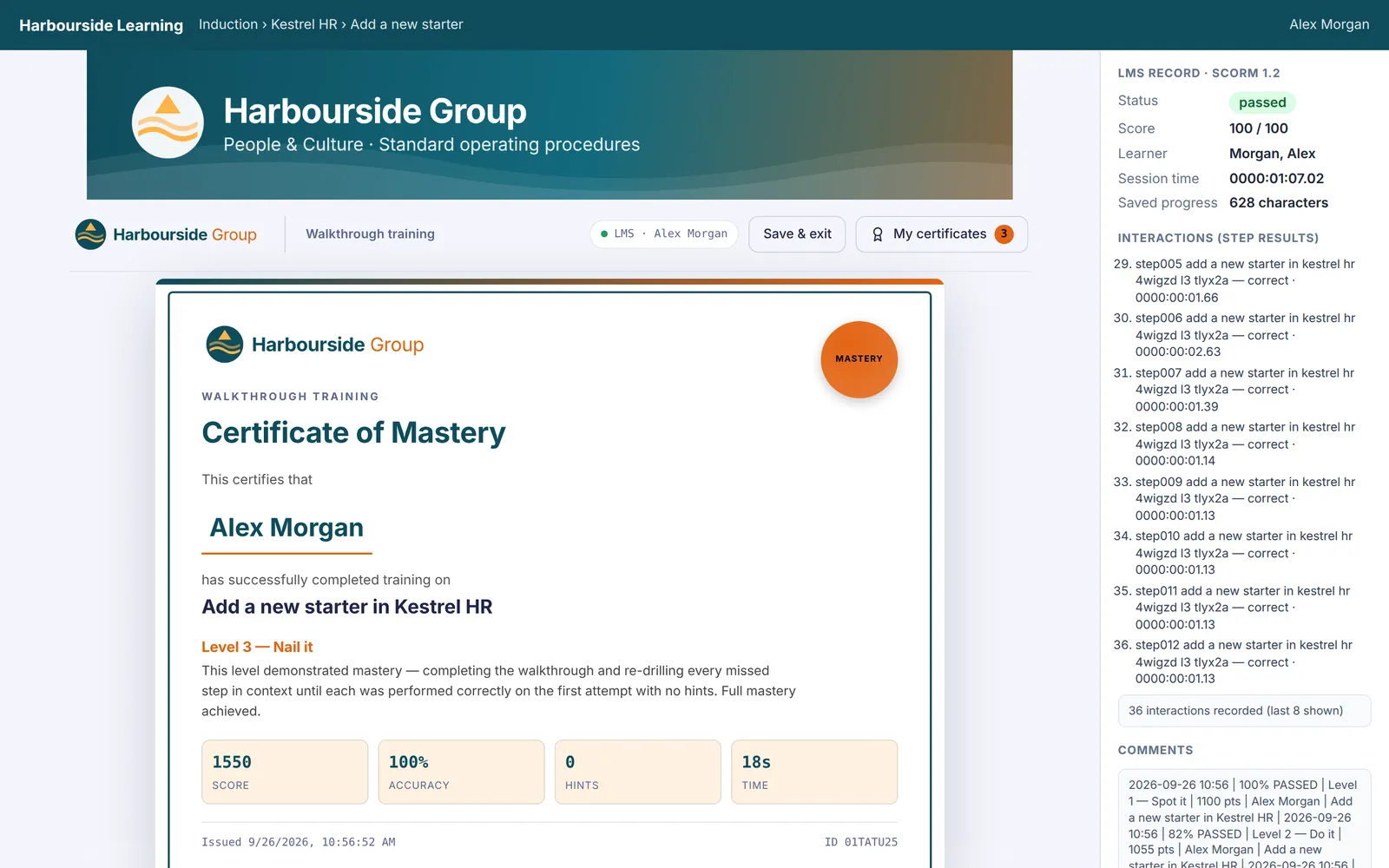
A Certificate of Mastery for Alex Morgan, Level 3 Nail it, 100% accuracy and no hints, shown inside the LMS with the status passed and 36 step results recorded.
Level 3 passed with every step right first time. On the right, what the LMS received.
Level 1: Spot it Recognition
The instructions are hidden. Learners click each target from memory, each one in turn on a merged screen; a hint shows the target.
Level 2: Do it Execution
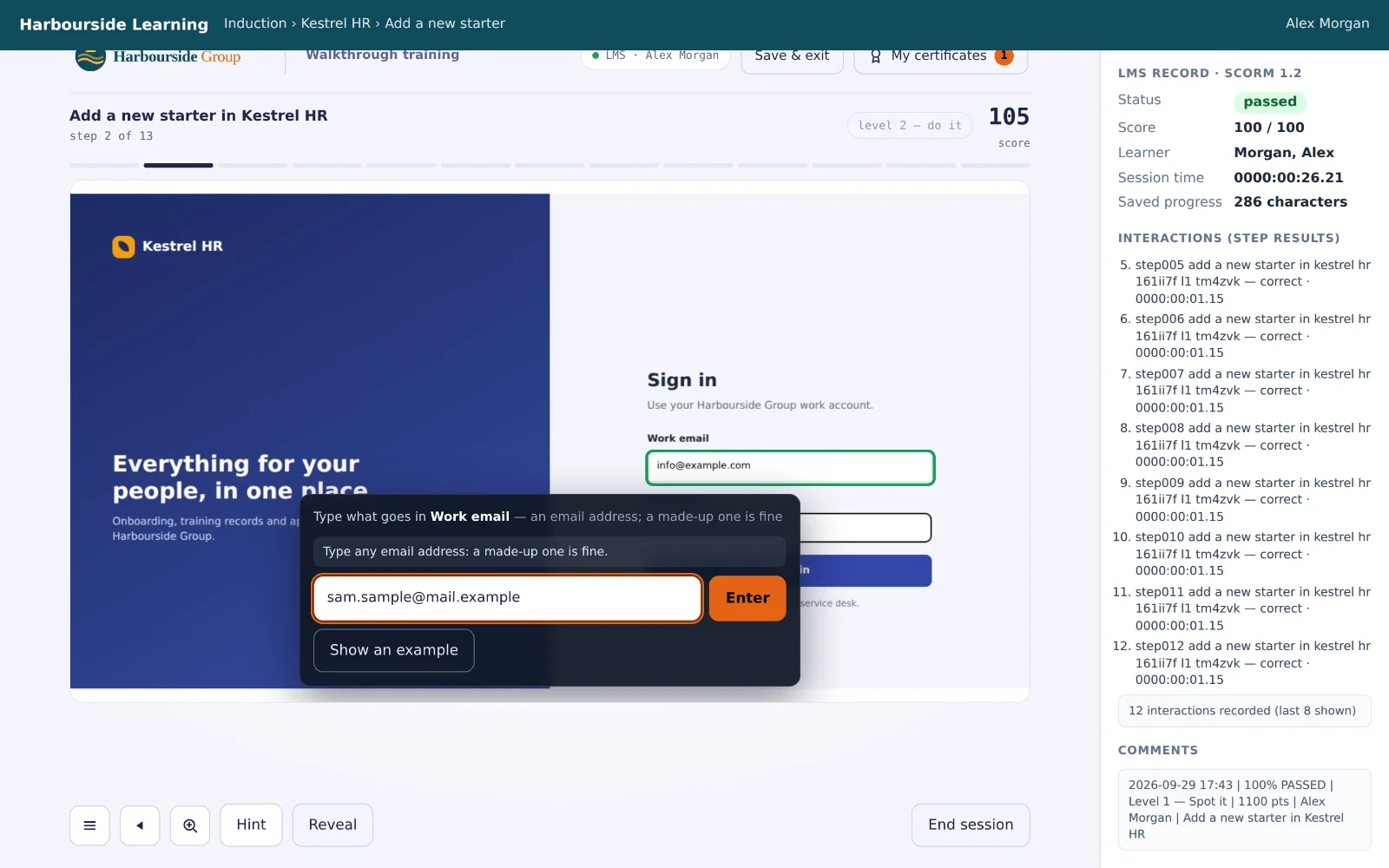
Also type the values and choose the options that were recorded, every field on a form. Where a personal detail was replaced, any made-up entry of the right kind counts; passwords are filled in with practice ones. Misses and hints cost points.
Level 3: Nail it Mastery
A full run, then every missed step is practised again in context until it's right first time with no hint. A clean result earns a Certificate of Mastery.

More than one task to cover? The Course builder puts walkthroughs together with the policy as a PDF, a briefing video and a quiz, in one course with one completion record, and takes the SCORM 1.2 and 2004 packages you already have. Its Compliance template opens the items in order, asks for time on each document and nearly all of each video, and needs Level 3 and every quiz at 90% or more, with a result below that reported as failed.

For a check that must show people can do the task without help, count only Level 3, set the pass mark to 90 and score by points, so hints lower the result. Try it yourself in the simulated LMS, or upload a demo package to your own LMS.

Personal details removed before anyone sees them

Recording a real system means recording real people. StepCert deals with that as each step is recorded, on your computer: the personal details it recognises are replaced with example data, in the step text, in later steps that mention them, and in the screenshot itself, drawn in the page's own font and colours. Documents and courses are built from the example data only.

  1. Replaced as you record. Jamie Morgan, typed into a new-starter form, becomes Alex Example; jamie.morgan@harbourside.example becomes info@example.com. Passwords, PINs and card-number fields are never recorded at all.
  2. Checked in the editor. A blue line on each step concerned says what was replaced. Put back anything that isn't personal, or choose your own stand-in, such as a training account. Every change can be undone.
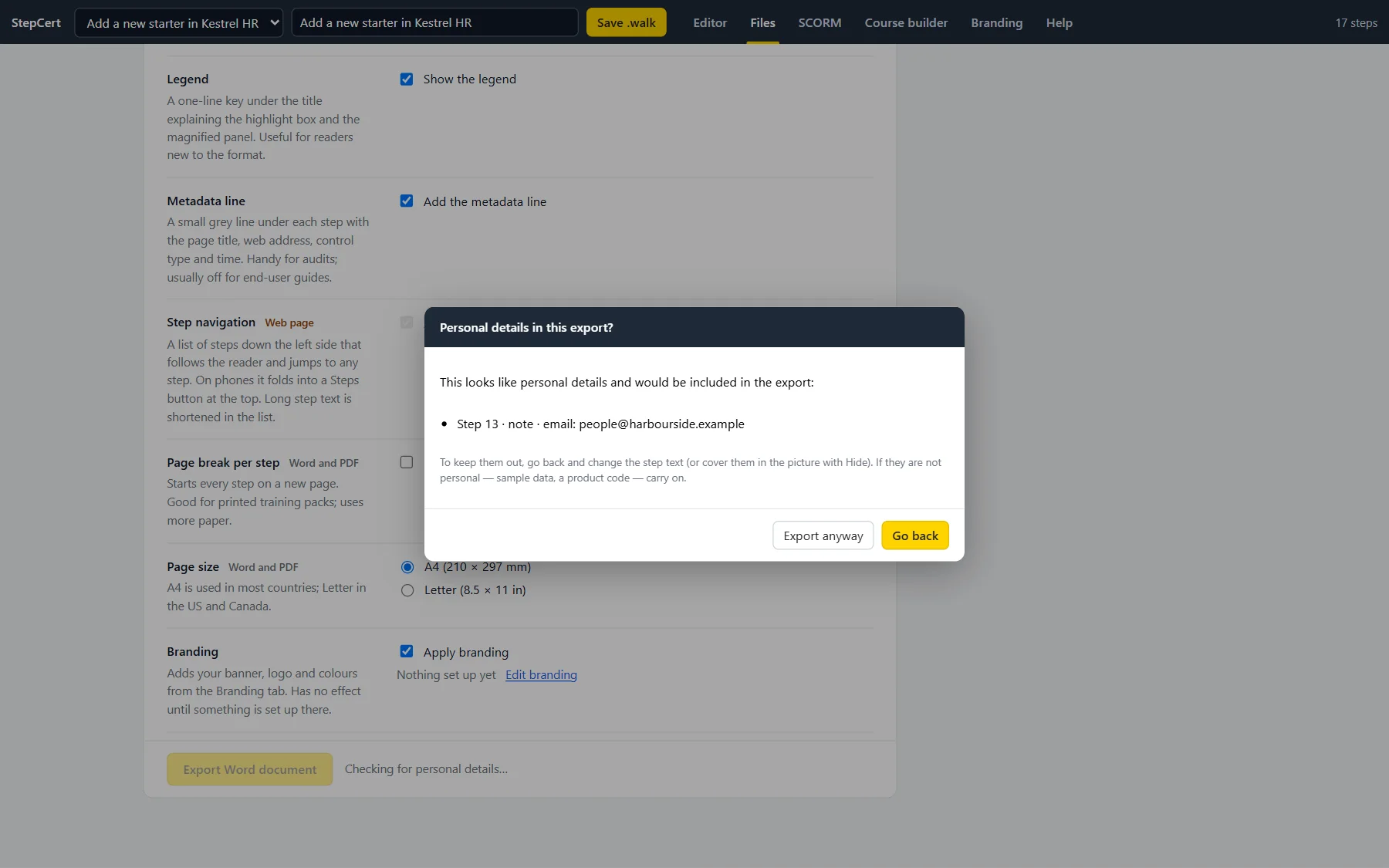
  3. Checked again before export. Before a document, a course package or a .walk file is made, StepCert lists any text that still looks personal, with the step it's in. The author fixes it, or confirms it isn't personal.
  4. Learned without the real details. Guides show a replaced detail as an example, “Enter the Work email (example: info@example.com)”, mark a replaced name elsewhere “(example name)”, word a password step “Enter your Password (never recorded or shown)”, and say in the legend that personal details are example data. In Levels 2 and 3, learners type any made-up entry of the right kind and are never asked for a real password, and the course home screen tells them which details were replaced.
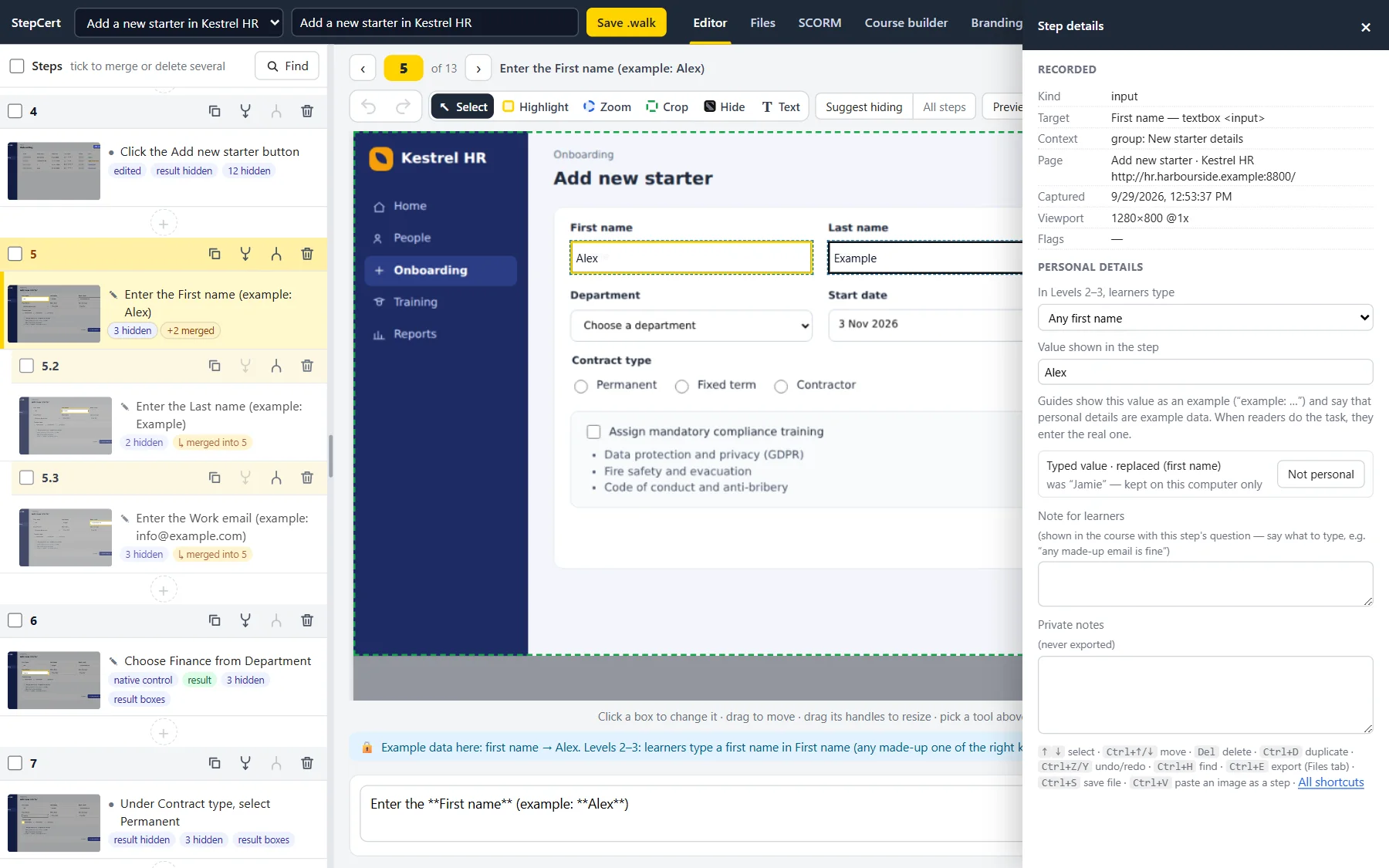
Step 5, Enter the First name (example: Alex), with the Step details panel open at Personal details: In Levels 2–3, learners type Any first name; Value shown in the step, Alex; a line saying guides show this value as an example and tell readers to enter the real one; and a line saying the typed value was replaced (first name), with the original kept on this computer only, beside a Not personal button.
The first name typed while recording became Alex. The original stays on the recording computer.
The Files tab with a dialog titled Personal details in this export? It lists Step 13, note, email: people@harbourside.example, explains how to keep it out, and has Export anyway and Go back buttons.
The check before exporting lists what still looks personal. Here, a team inbox the author chose to keep.
Level 2 asking the learner to type what goes in Work email, an email address, and saying a made-up one is fine, with the note for learners Type any email address: a made-up one is fine. The learner has typed the made-up address sam.sample@mail.example, not the example on screen.
In the course, any made-up email address counts. Nobody types real details.
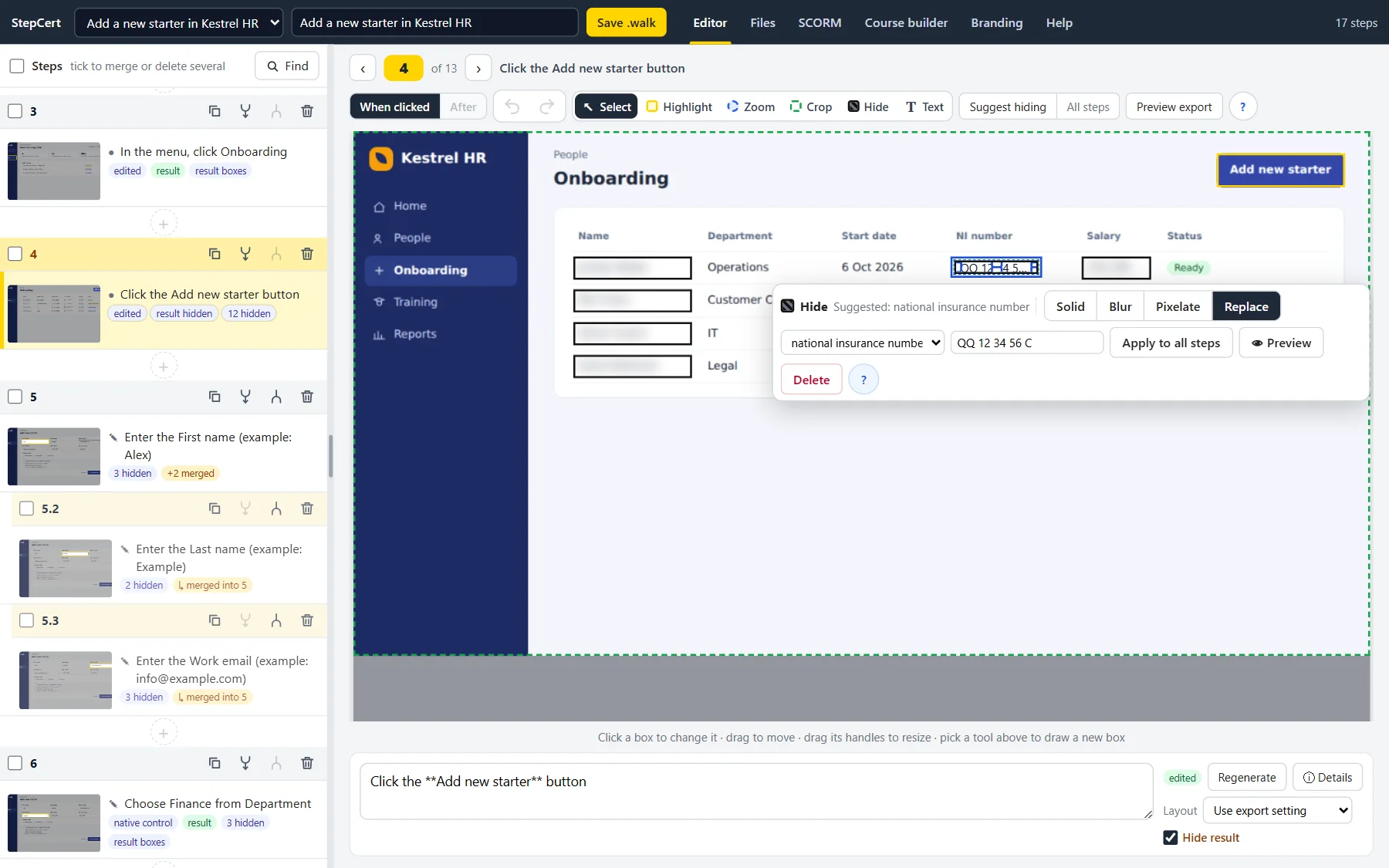
The onboarding list in the editor. The NI numbers were replaced while recording: the selected box's toolbar reads Suggested: national insurance number, with Solid, Blur, Pixelate and Replace, Replace chosen, and the example QQ 12 34 56 C. The other starters' names and salaries are blurred by Hide boxes.
NI numbers in a list, replaced while recording. Names and salaries blurred by hand.
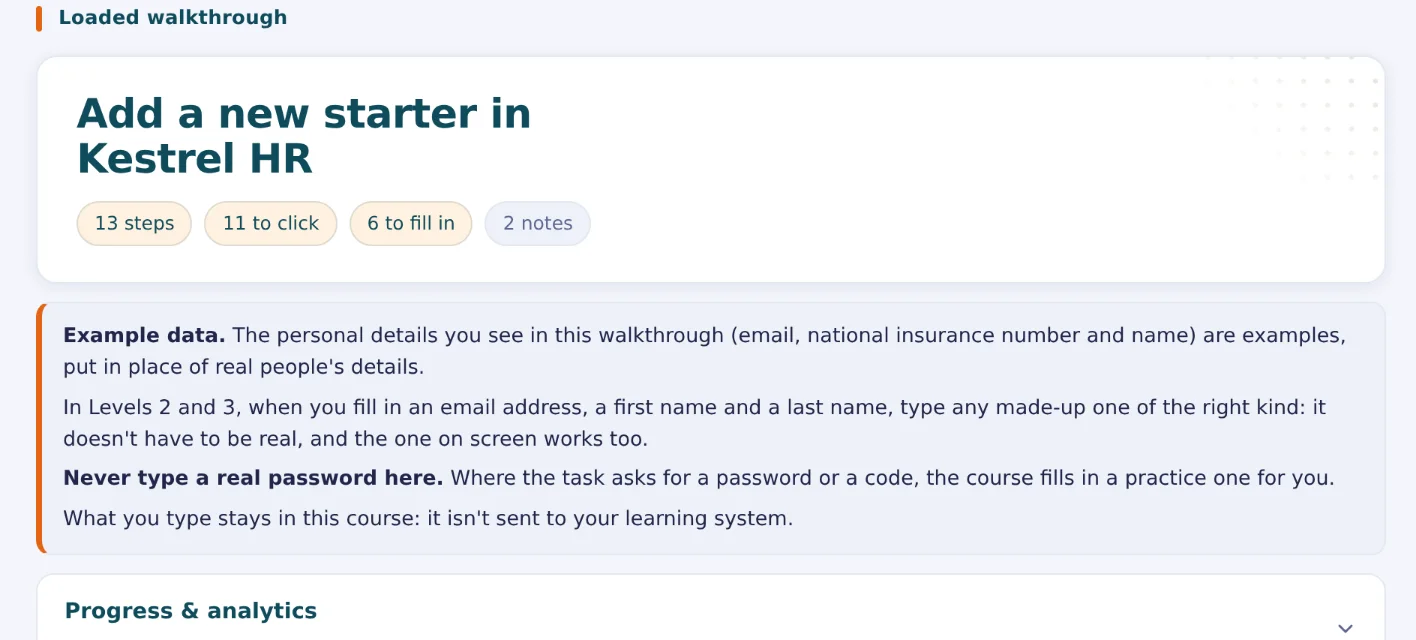
The course home screen, showing 13 steps, 11 to click and 6 to fill in, with a note headed Example data: the personal details in this walkthrough (email, national insurance number and name) are examples, put in place of real people's details. In Levels 2 and 3, when you fill in an email address, a first name and a last name, type any made-up one of the right kind. Never type a real password: the course fills in a practice one. What you type stays in the course and isn't sent to the learning system.
What learners are told on the course home screen.
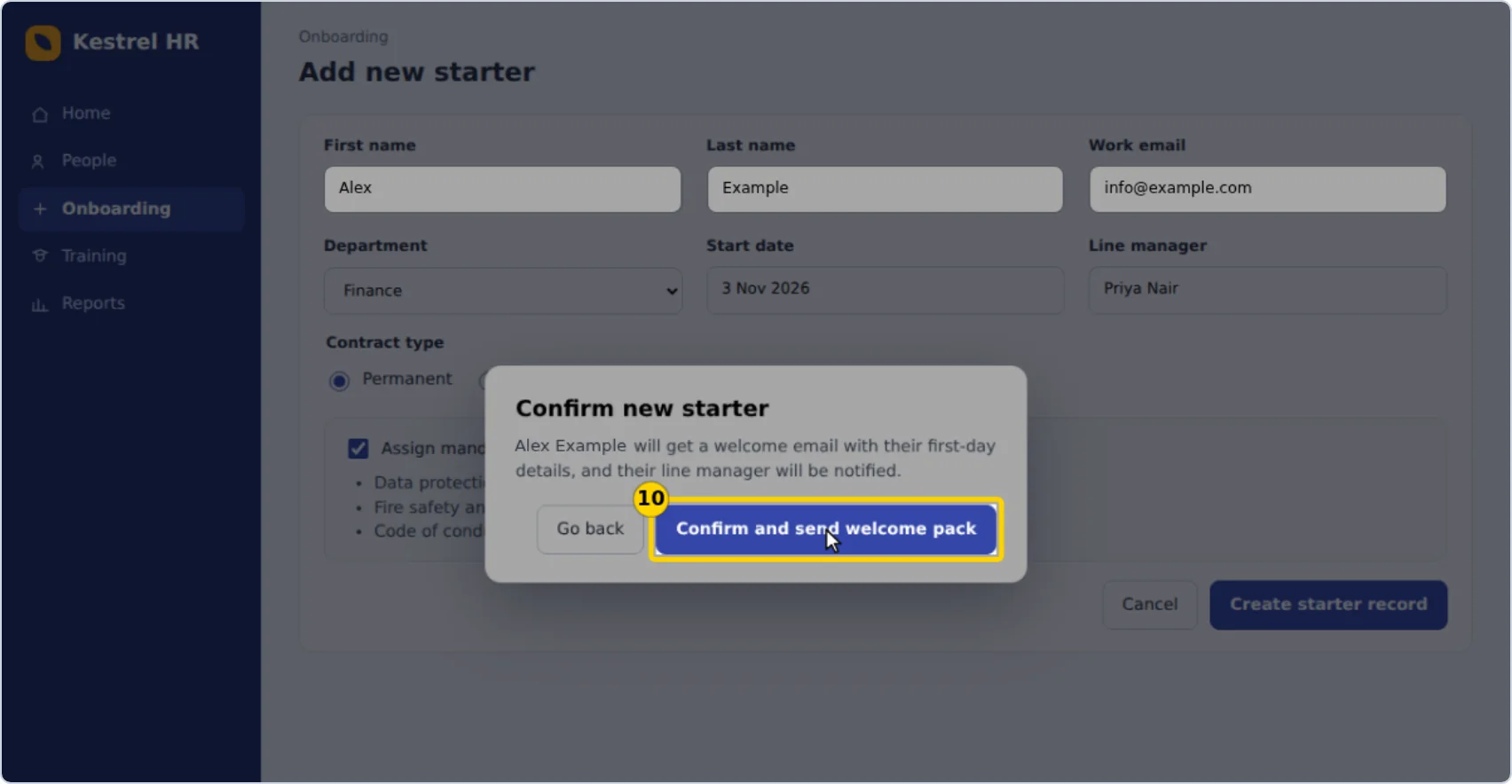
Step 10 of the exported web page: the Confirm new starter dialog reads Alex Example will get a welcome email with their first-day details, and the form behind it reads Alex, Example and info@example.com.
The name typed on the form was replaced again where it reappeared, in the dialog's own text.
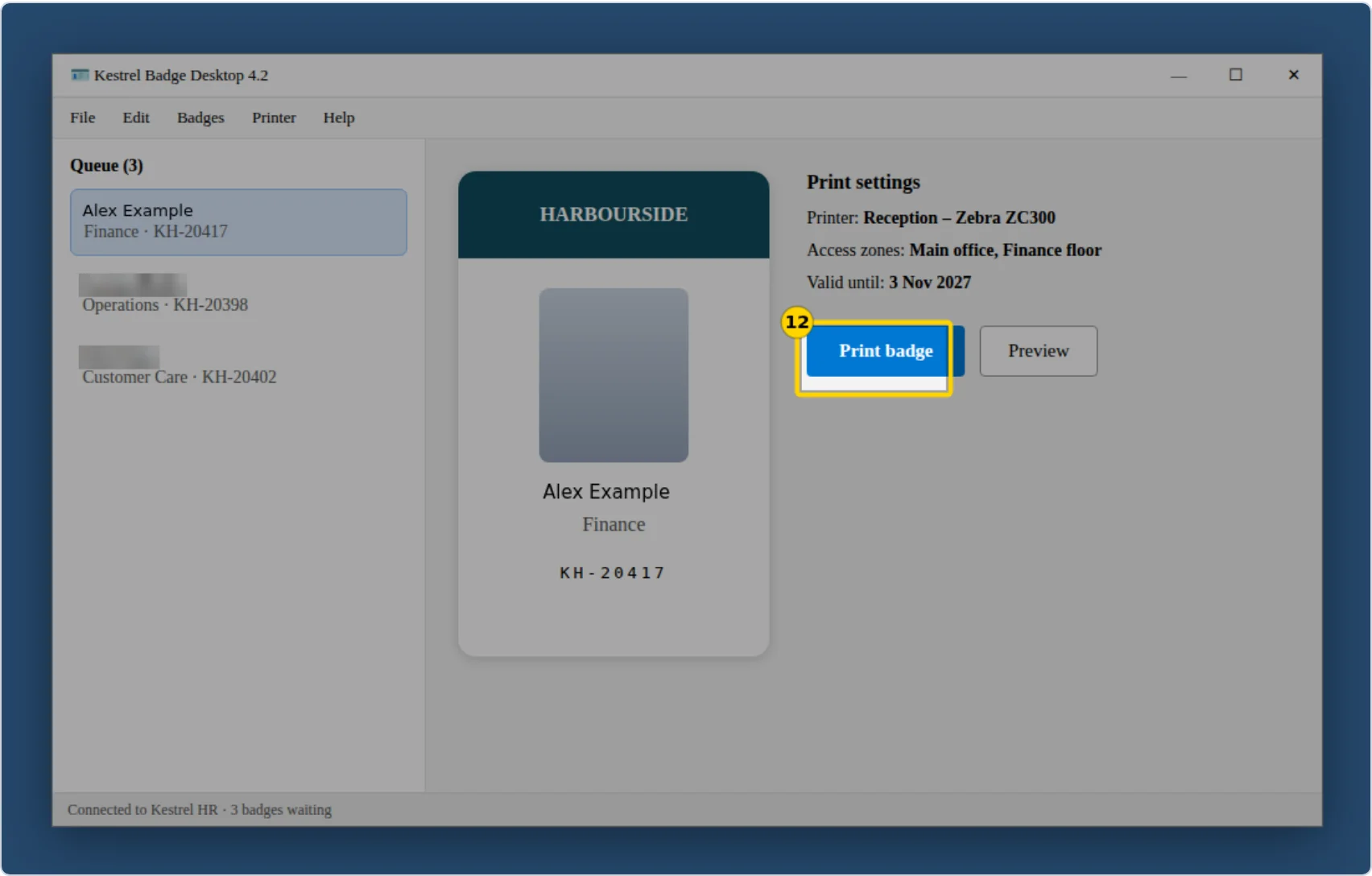
Step 12 of the exported web page: Kestrel Badge Desktop, with the new starter's name on the badge and in the print queue reading Alex Example, and the other names in the queue blurred.
A desktop app, added as a picture: its names were replaced and blurred by hand, and painted into the export.
What it recognises
Names, first and last names, email addresses, phone numbers, postal addresses, towns and postcodes, dates of birth, usernames, card numbers and expiry dates, IBANs, sort codes and account numbers, passport and driving licence numbers, UK National Insurance numbers and US social security numbers, each with its own example.
National ID numbers across Europe
The personal identity, tax and social security numbers of every EU country, and of Iceland, Norway and Switzerland: for example the French NIR, German social insurance number, Italian codice fiscale, Spanish DNI and NIE, Dutch BSN, Belgian national register number, Irish PPS number, Polish PESEL, Swedish personnummer and Danish CPR number. Each is recognised by its format, and by its check digit where it has one, so ordinary numbers aren't mistaken for one.
Where it looks
Everything you type into a field for personal details, found from the field's type, its label and the value. In the rest of the page: email addresses, card numbers, IBANs, UK postcodes, National Insurance and social security numbers, ID numbers next to their label, and any name or detail you typed earlier in the same recording. Button and link names, dialog and page titles, web addresses and dropdown options are included.
The originals stay on the recording computer
So the author can put one back if it wasn't personal. They never go into a document or course package. A .walk file, the editable project, leaves them out of its text but keeps each screenshot as recorded, with the boxes on top so they stay editable.
Burned in, not layered on
In documents and courses, every Replace and Hide box is painted into the pictures, as example data, a solid block, a blur or pixelation, so the detail isn't in the file at all, even if someone unzips it.
Never recorded
Password, card-number, security-code, PIN, one-time-code and passport fields are recorded as dots, never the value. For passwords, PINs and codes, guides say “Enter your Password (never recorded or shown)”, the pictures show a fixed row of practice dots, and courses fill in a practice one, so learners never type a real password or code into a course. Card-number and passport steps show an example instead, and learners type a made-up one.
Hide the rest
Draw a Hide box over anything else, or let Suggest hiding cover what StepCert noticed on the page, such as phone numbers in page text. Copy a box to every step taken on the same page at the same window size.
What it can't do
It finds details by their labels and their format, not by reading the picture: a name in ordinary page text is replaced only if it was typed earlier in the recording, and apps that draw their content as a picture show it nothing to find. Other values typed while recording appear in the step text and in courses. Record with test data where you can, and check every picture before you share it.

Questions your security and privacy team will ask

Straight answers, so your review can start with the facts. For the people who weren't in the meeting, the three-page brochure (PDF) sums StepCert up.

Where are recordings stored?

In the browser profile on the computer used to record, in the browser's own storage for extensions, together with the originals of any personal details replaced with example data. StepCert adds no encryption of its own, so protect those computers as you would any that hold sensitive files: full-disk encryption, managed browser profiles and screen locks. Exports and .walk files are ordinary files, stored wherever you save them.

What does the extension send over the network?

Licence traffic to stepcert.com: your email address, licence key, a random browser ID and a description such as “Chrome on Windows” when you sign in; a sign-in token and that browser ID about once a day; and a sign-in token when you sign out or open Manage subscription. No screenshots, step text, page addresses or typed values, and no analytics, crash reports or tracking. The only other request is one an author asks for: adding a YouTube, Vimeo or SoundCloud link to a course looks up that video's title and thumbnail at www.youtube.com, vimeo.com or soundcloud.com and their image servers, with no cookies and no referring page. Nothing else is fetched from any address.

Which browser permissions does it ask for, and why?

Tabs, to take a picture of the page being recorded and read its title and address. Scripting, to start the recorder in tabs that were already open when you press Start recording. Storage and unlimited storage, to keep recordings on your computer. Web navigation, to know when a page has finished loading after a click. Side panel, for StepCert's controls. Access to all sites, because you choose which system to document; the recorder ignores every page until a recording is running. The Course builder reads only the files and the folder an author chooses, through the browser's own file permission prompt, which is asked again in each new browser session. Chrome and Edge let administrators control which extensions can be installed and which sites they can run on. For those policies, StepCert's Chrome Web Store ID is flojjdckiccjifoepdjghcaeglngjbkn.

Does it use AI?

No. Step wording comes from the names a screen reader would announce for each button and field, worked out on your computer. Nothing is sent to a model.

Can it run without an internet connection?

For up to 7 days after its last licence check. After that it needs to reach stepcert.com before it will record or export again. It can't be used on networks that never connect to the internet.

Is there single sign-on or a central admin console?

No. Each person signs in with their email address and licence key, on up to 3 browsers. To give everyone the same branding, export, course and recording settings, share a settings template (.stepcert file).

Who handles the licence data?

Stripe takes payments and runs the billing pages. Cloudflare hosts stepcert.com and the licence database and sends licence emails. Our privacy policy lists what each one handles and for how long we keep it.

What's inside a course package?

The training player, the walkthrough with Hide boxes burned into the pictures and private notes removed, your brand images, and for SCORM the standard's schema files. Ordinary values typed while recording are included, because learners type them in Level 2; personal details are there only as example data, and learners may type any entry of the right kind. Page addresses and titles are left out. Before building, StepCert lists anything in the text that still looks personal. The course loads nothing from the internet and sends results only to your LMS or learning record store. A Course builder course also holds the files the author added (videos, captions, PDFs and documents) and any imported SCORM package, unchanged; if the author put a YouTube or Vimeo video in it, that video plays from that service.

Which personal details does StepCert remove, and how?

Names, email addresses, phone numbers, addresses and postcodes, dates of birth, usernames, card and bank details, passport and driving licence numbers, UK National Insurance and US social security numbers, and the national ID numbers of every EU country, Iceland, Norway and Switzerland. They're found on your computer by the field's type and label and by each detail's format and check digit, with no AI or online service, and replaced with example data in the step text and the screenshot. See Personal details removed before anyone sees them.

Can the originals of replaced details end up in a file?

Not in a document or a course: they're built from the example data, with every box painted into the pictures. The originals are kept only in the recording browser, so the author can put one back. A .walk file, the editable project, leaves them out of its text, but keeps its screenshots as recorded with the boxes on top, so treat .walk files like the recordings themselves.

What happens if we stop paying?

Every document you've exported and every course you've uploaded keeps working; they never check the licence. Walkthroughs stay on your computer, and .walk files can still be opened, edited and saved. Recording and exporting need an active licence.
Good practice for recording regulated systems

StepCert keeps recordings on your computer. What you put in them, and where the files go afterwards, is up to you.

  1. Record in a training or test environment, with test records, wherever you can.
  2. After recording, look through the steps marked with a blue example-data line, press All steps beside Suggest hiding, then check every picture, result pictures included.
  3. Read each step's text: ordinary values typed while recording appear there and in courses. Don't click past the check before exporting without reading it.
  4. Keep Strip query strings from URLs on (it is by default), and turn the metadata line on only if page addresses carry no identifiers.
  5. Check a .walk file before sending it outside your team: private notes travel in it, and so do the screenshots as recorded, under their boxes.
  6. Keep exported files and .walk files where your records policies apply, such as your document management system.

When StepCert isn't the right fit

  • Disconnected or classified networks: StepCert checks its licence with stepcert.com at least once every 7 days.
  • Systems that run only as desktop programs or through a remote desktop: steps can only be added as screen captures, one at a time.
  • Single sign-on, a central admin console, or guides shared as cloud links with viewer analytics: StepCert doesn't offer them.

One plan with everything in it

$399a year

For one person. Unlimited walkthroughs, exports, courses and learners.

  • Private by design. Recordings and screenshots stay on your computer: no cloud, no upload, no AI service. Personal details become example data as you record.
  • A proper editor. Merge a form into one picture, zoom in on small controls, and hide anything else private in one click.
  • One recording, every format. Word, PDF, PowerPoint, web page, Markdown, JSON, video, a video guide, a click-through demo and animations.
  • Certified proof of competence. SCORM 1.2, SCORM 2004, xAPI and cmi5 courses with practice levels, certificates and step-by-step LMS records.
  • The Course builder. Walkthroughs, videos, documents, quizzes and your existing SCORM packages in one LMS course (in Chrome and Edge).
  • Files you can hand on. Editable .walk files, and a settings template that gives the whole team the same branding and settings.
  • Your brand on everything. Banner, logo and colours on documents, courses and certificates.
  • On the Chrome Web Store now, with Microsoft Edge and Firefox coming soon. Use it on up to 3 browsers, and offline for up to 7 days.
  • Every update while you're subscribed, and email support from the people who make it.

Secure checkout by Stripe. Cancel any time from your account page. Documents and courses you've already made keep working after you cancel. If StepCert isn't right for you, email us within 30 days for a full refund.

For a school, college or company? Ask for a free trial and team pricing with the form.

Each person who records or edits needs their own licence; learners taking your courses need nothing, and anyone with StepCert can open the .walk files you share.

Schools, colleges and organisations

Training a department, a school or a whole company? Educational and enterprise users can try StepCert free, and tiered pricing plans bring the price per person down as your team grows, from a handful of people to over a thousand. Tell us about your organisation and we'll email you the details.

Type of organisation

We use these details only to reply to you. Cloudflare Turnstile checks that the form isn't sent by a bot; see our privacy policy.

Prefer email? Write to sales@stepcert.com. Sharing StepCert with colleagues? Download the three-page brochure (PDF).

Try it on your own systems

Record a task in your training environment, check the example data, and upload the course to your LMS.

Install it from the Chrome Web Store. Microsoft Edge and Firefox versions are coming soon.

One licence per person, with a 30-day money-back guarantee. Need answers for a supplier review? Email sales@stepcert.com.

This page sums up regulations in general terms, as checked on 28 September 2026, to show where StepCert may fit. It isn't legal or compliance advice, and using StepCert doesn't by itself make you compliant with any law, regulation or standard. Rules change, and how they apply depends on your organisation: check with your compliance, privacy or legal team. The bodies that issue these rules don't endorse StepCert.